
How Hackers Use Cookies to Bypass 2FA (and What to Do About It)
Two-factor authentication (2FA) is still worth using. But here’s the part people miss: most modern attackers don’t “break” 2FA they bypass it by stealing the thing your browser uses to prove you already passed 2FA: the session cookie.
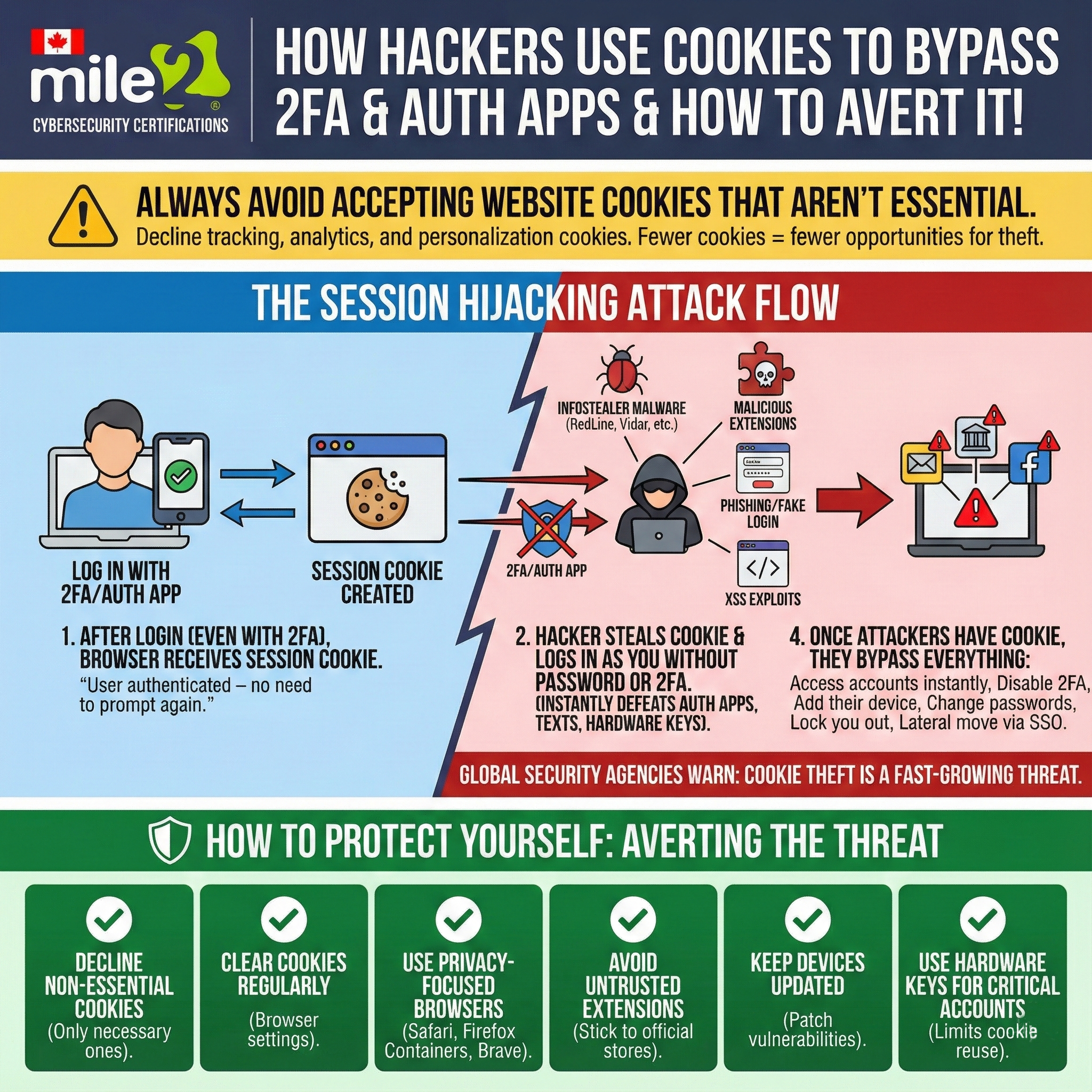
The simple version: 2FA protects the login… not the session
After you log in (password + authenticator app / SMS / key), your browser receives a session cookie that tells the website:
“This user is already authenticated—don’t prompt again.”
If an attacker steals that cookie, they can often impersonate your session without needing your password or your 2FA code. That’s session hijacking, and it can defeat authenticator apps, text codes, and sometimes even hardware keys—because the attacker isn’t logging in, they’re reusing your already-logged-in session.
How attackers steal cookies in real attacks
Common methods include:
- Infostealer malware (designed to pull browser data like cookies and saved sessions)
- Malicious browser extensions (especially shady Chrome/Edge add-ons)
- Phishing links / fake “re-authentication” prompts that capture tokens or session data
- Website exploits like cross-site scripting (XSS) that can expose session information
Once the attacker has your session cookie, they may be able to:
- Access your account instantly
- Change your password
- Disable your 2FA / add their own auth method
- Lock you out
- Pivot into other services via SSO (single sign-on)
The cookie mistake most people make
When websites ask you to accept cookies, they often bundle tracking, analytics, and personalization cookies that aren’t required for the site to function.
More stored cookies = more session data sitting around = more opportunity for theft and abuse.
Rule of thumb: if it’s not essential, decline it.
How to protect yourself (do these today)
Personal checklist
- Decline non-essential cookies
- Clear cookies regularly (especially after using shared/public devices)
- Use privacy-focused browsers / features (Safari, Firefox Containers, Brave)
- Avoid untrusted browser extensions (and remove the ones you don’t truly need)
- Keep your OS + browser updated (patches reduce exploit/malware success)
- Use hardware security keys for critical accounts (more phishing-resistant, limits some replay scenarios)
If you manage a business/team
- Train staff on token/cookie theft and modern phishing (it’s not “just passwords” anymore)
- Lock down browsers with extension allow-lists
- Use device compliance + EDR to detect infostealers
- Enforce short session lifetimes + re-authentication for sensitive actions
- Monitor for impossible travel / unusual session behavior
Want to go deeper? Mile2 certifications to level up
If you want to understand (and defend against) these attacks professionally, these three are a strong path:
- Certified Information Systems Security Officer (C)ISSO)
- Certified Penetration Testing Engineer (C)PTE)
- Certified Network Forensics Examiner (C)NFE)